
Smartphones have long been the primary source of distraction when it comes to your productivity. Smartphone manufacturers introduced several features like silent mode and “do not disturb” to address this issue. But these features did very little to address the issue, and people around the world still found themselves procrastinating for hours. Recognizing the severity of the issue, smartphone giant Apple introduced “Focus Mode” in iOS 15, which was later updated with newer features in iOS 16.
So what does Apple’s Focus Mode really work? And does it really help you stay focused, or is it fancy new features distracting you from your primary goals? Let’s find out in this detailed article on Focus Mode.
What does focus mode do?
You can think of focus mode as an evolution of Apple’s “Do not disturb” feature. The main reason people get distracted by their phones comes down to the notifications they receive. Most of us are on social media, and an untimely notification of your friend posting about her cat can make you end up scrolling aimlessly through your Instagram feed for hours. The “Do Not Disturb” features simply block all notifications to help you stay focused.
But it was soon apparent that blocking all notifications is not the way to go as you may end up missing important notifications putting you in embarrassing situations.
Apple’s “Focus Mode” is an extension of the “Do not Disturb” feature, which enables you to customize which notifications you want to receive.
For example, when you start working from 9 am, you can set Work focus mode, which will only allow notifications from office apps like slack or mail, and stop other notifications from Instagram and Facebook.
Again at 5 pm, the focus mode will change according to users’ preference and allow all or the apps that they select to send notifications.
What makes Focus mode special?
The concept of “Focus Mode” is cool, but if we are honest, there is nothing proprietary about the app, and there have been similar third-party options out there.
But Apple really shines in the consistency and the wide range of devices the app supports. You change your focus mode on your laptop, and all your devices, from iPhone to apple watch, will now be automatically switched to that specific focus mode. How cool is that?
In iOS 16, Apple took its Focus Mode a step further and introduced more customization in the Focus mode. You can now change your wallpaper and ring tone depending on your focus mode, giving users more granular control over the app.
How to set up “Focus Mode” on an Apple device?
Setting up focus mode is a simple process and does not require installing any new apps. Make sure your iPhone is updated on iOS 15 or later.
Setting up iPhone Focus Mode
Step 1: In iOS 15 on your iPhone or iPad, open the Settings app
Step 2: Just above Screen Time, tap Focus
Step 3: On the main Focus screen, you’ll find Do Not Disturb, Sleep, Personal, and Work to start with the option to add custom Focus modes with the + icon in the top right corner “Share Across Devices” is enabled by default — tap the toggle to turn it off
Step 4: Below that, you have options to customize which apps can access your Focus Status and how phone calls work when Focus is turned on
Note: Focus works on Mac, iPad, and Apple Watch, too with the macOS Monterey, iPadOS 15, and watchOS 8
How to turn off Focus Mode
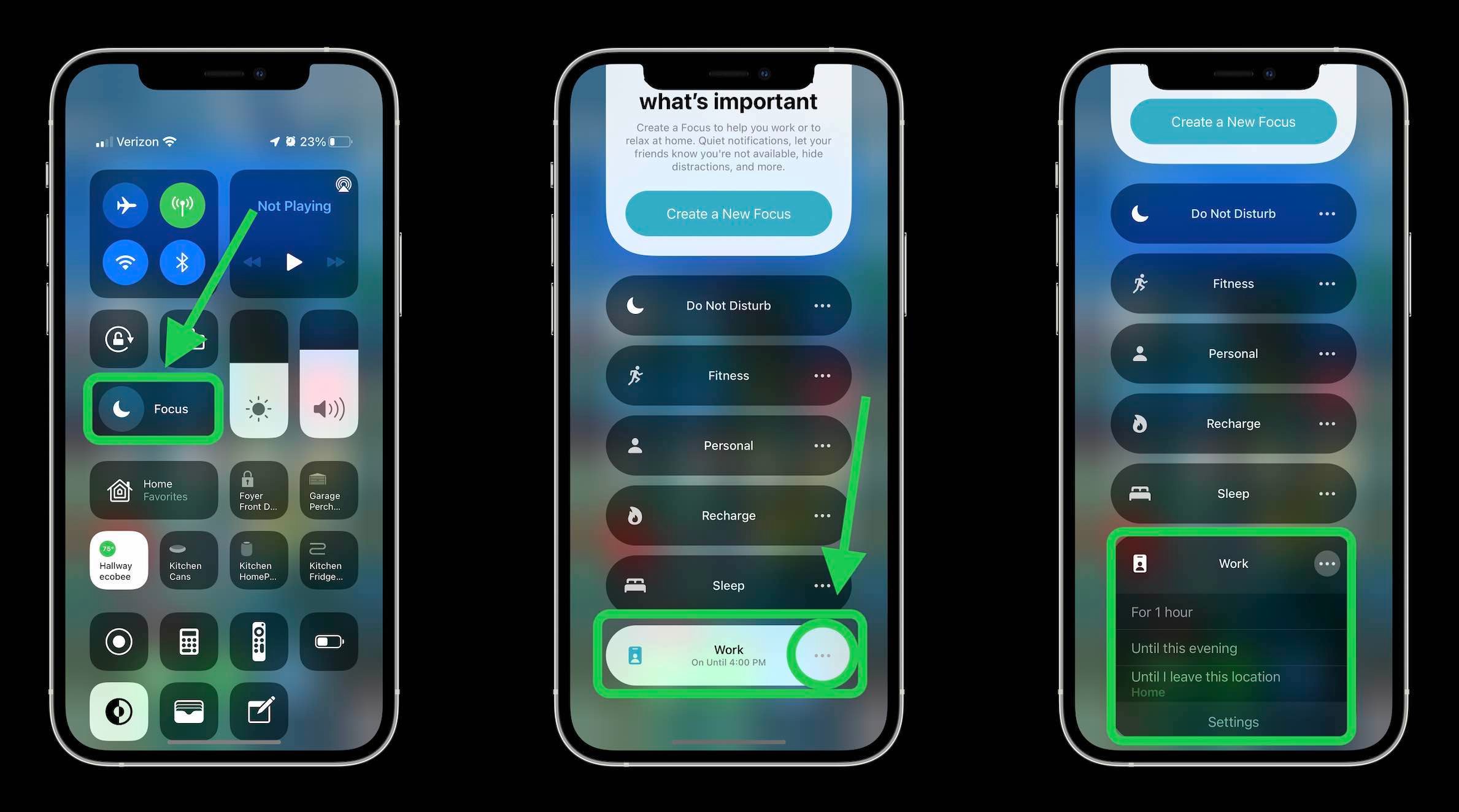
You can turn off-focus mode anytime by swiping down from your iPhone screen and opening the control center. Here you will see a large “Focus” icon; tap on it to toggle it on and off.
Focus Status
Apple is also testing out new features to enhance its Focus mode. A recent beta version of iOS 16 came with an auto-reply feature that will notify your contact when they call someone who has focus mode turned on. Apple calls this feature Focus Status and the main objective is to allow your contact to reach you in times of emergencies. This feature is still in the testing phase, and it will be interesting to see how it turns out to be when it is finally released to the public.
Conclusion
Both Apple and Google have released several useful features over the years that help track the time you send on your phone. Apple’s new Focus Mode has several new features that help you to stay focused and get things done. It also works on all your Apple devices and offers useful customization that should really help optimize the whole experience. We will keep an eye on how users take advantage of the new Focus mode and keep you posted.
That concluded our article on Apple’s Focus Mode. Make sure to use them in your workflow and let us know which one you find the most useful in the comment section. For more productivity tips and tricks, do not forget to keep an eye on our Newsletter.


